

Churches today serve people both in the room and watching from afar. A thoughtful church website live streaming strategy helps you care for both audiences without creating extra work for your team. When your website becomes the central hub for worship, connection, and next steps, live streaming supports discipleship rather than competing with in-person ministry.
One Church, Two Experiences, One Mission
On any given Sunday, your church likely serves people sitting in the pews and people watching from their living rooms. Some are traveling. Some are home with sick kids. Others are exploring faith quietly online before ever visiting in person.
For pastors, this can raise honest questions. How do we care well for both groups? How do we avoid creating a divide between those who attend in person and those who join online?
The goal isn’t choosing one over the other. It’s shepherding one church family through multiple touchpoints. When your website is designed intentionally, it becomes the place where both audiences gather, engage, and take next steps.
This post explores how your church website can support both in-person and online worshipers—using live streaming, digital tools, and clear communication to serve everyone faithfully.
1. Use Your Website as the Central Gathering Place
Your website should function as more than an information board. It should act as the front door where both in-person and online attendees know exactly where to go.
When livestream links, service times, and next steps live in one clear location, confusion fades. People feel guided rather than overwhelmed.
Ways to Centralize Worship:
- Prominent livestream access on the homepage
- Clear service times for in-person gatherings
- Simple navigation for sermons and replays
- Easy access to online bulletins
- A setup that helps you live stream without a headache
A centralized website reminds everyone they belong—no matter how they attend that week.
2. Create a Welcoming Online Experience During the Stream
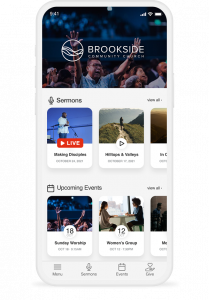
Online worshipers need more than a video player. They need context, clarity, and a sense of welcome.
A few intentional touches help transform a broadcast into a ministry experience.
Online-Friendly Elements:
- A brief welcome slide before the stream starts
- Clear instructions for participation
- Digital connection cards
- Links to prayer requests and giving
- Tools that help create engaging live stream moments
These elements communicate care and hospitality to guests who may be watching anonymously.
3. Support In-Person Worship With Digital Tools
Live streaming doesn’t replace in-person worship—it supports it. Your website can enhance the physical gathering by offering tools that reduce distraction and improve focus.
Helpful Digital Tools:
- Online bulletins that reduce paper clutter
- Sermon notes accessible on mobile devices
- Event sign-ups available during service
- Giving links that are easy to find
- Options to live stream on a budget without distraction
When digital tools serve the room, people stay engaged with worship rather than logistics.
4. Offer Clear Calls to Action for Both Audiences
Every service invites a response. The key is making those responses clear for everyone watching.
Your website helps guide next steps without awkward pauses or confusing instructions.
Calls to Action That Serve Both:
- “Plan a Visit” links for online guests
- Digital connection cards during the sermon
- Prayer request forms shared verbally and visually
- Next-step pages for groups or serving
- A professional live stream setup that supports clarity
Clear invitations help people move from watching to belonging.
5. Keep Replays and Sermons Easy to Find
Not everyone can watch live. Making replays easy to access helps people stay connected on their schedule.
Best Practices:
- Archive livestreams on sermon pages
- Label messages clearly with dates and topics
- Embed videos directly on your website
- Avoid sending people hunting through platforms
- Use the must-have tools for live streaming church services wisely
When content is easy to find, people engage more consistently.
ChurchSpring’s Live Streaming feature allows churches to stream and archive services directly on their website, keeping everything centralized and easy for members and guests to access.
“Editing the pages and inserting images are easy to do. Most of all, posting our church videos from YouTube is quick and has no difficulty. Live-streaming feature is easy to use. Lastly, the customer service is great and helpful.”
Tom L., Pillars of Faith Tabernacle
6. Build Consistency Across All Touchpoints
Consistency builds trust. When your livestream, website, and in-person experience feel aligned, people feel grounded.
Areas to Keep Consistent:
- Branding and language
- Service flow and expectations
- Navigation and page layout
- Communication tone
Consistency helps your church feel unified—no matter where people engage.
ChurchSpring’s live streaming platform is designed to bring website, livestreaming, and communication tools together in one place, helping churches respond to real needs as they grow.
“Becoming part of the ChurchSpring family was one of the best decisions we could have made. I like the fact that ChurchSpring listens to the needs of their members and is always introducing new features based on member recommendations.”
Pam R., Changing Times
7. View Live Streaming as Pastoral Care, Not Production
At its heart, live streaming is about care. It serves homebound members, curious guests, and families navigating busy seasons.
When your website supports live streaming well, it becomes an extension of shepherding—not a tech burden.
Pastoral Benefits:
- Continued connection during illness or travel
- Gentle entry points for seekers
- Ongoing discipleship touchpoints
- Affordable live streaming options for less strain on the budget
- Ministry-first use of digital tools
When framed this way, live streaming strengthens—not replaces—gathered worship.
How Your Church Website Brings In-Person and Online Worship Together
Your church doesn’t have two congregations—one online and one in person. You have one church family gathering in different ways.
A well-designed website helps you serve both audiences with clarity, warmth, and Gospel purpose. It centralizes worship, guides next steps, and supports discipleship throughout the week.
When your website and live streaming work together, ministry becomes more accessible without becoming more complicated.
See how ChurchSpring’s Live Streaming feature helps churches serve both in-person and online worshipers with confidence and care. Try ChurchSpring free for Try ChurchSpring free for 7 days or join a live demo to see how your website can support every way your church gathers.
FAQs
1. Does church live streaming replace in-person worship?
No. Live streaming supports in-person worship by extending care and connection when people cannot attend physically.
2. How can churches avoid creating two separate audiences?
Using the church website as a central hub helps unify experiences and guide everyone through the same next steps.
3. Do churches need expensive equipment to live stream well?
Not necessarily. Many churches succeed with simple setups focused on clear audio, stable video, and consistency.
4. Where should live streams be hosted?
Hosting livestreams on your church website keeps worship distraction-free and easy to access for all ages.
5. How often should churches live stream services?
Consistency matters more than frequency. Many churches choose to stream weekly services and occasional midweek gatherings.